Saturday, December 15, 2012

Working with Stored Procedures with JDBC

How To Deal with Stored Procedures with JDBC 

To Deal with Stored Procedures with JDBC we need to create the connection and callable statement in the init() of the servlet.Here is an example on how to execute a stored procedure with JDBC ....


package app;
import java.sql.*;
public class Dips1

{

private String url = "jdbc:oracle:thin:@localhost:1521:XE";
private String driverClass = "oracle.jdbc.driver.OdbcDriver";
private Connection con;
private CallableStatement cs;

public Dips1()

{
try {
Class.forName(driverClass);
con= DriverManager.getConnection(url, "scott", "tiger" );
cs= con.prepareCall(
"{? = call sp_sav_Bom_Header( ?, ?, ?, ?, ?, ?, ?, ?, ?, ?, ?, ?, ?, ?, ?, ?, ?, ?, ?, ? ) }"
);
cs.registerOutParameter( 1, java.sql.Types.VARCHAR );
cs.setInt( 2, -2 );
cs.setInt( 3, 39 );
cs.setString( 4, "format" );
long ltTest = new java.util.Date().getTime();
System.out.println( "Today: " + ltTest );
cs.setTimestamp( 5, new Timestamp( ltTest ) );
cs.setString( 6, "type" );
cs.setString( 7, "submitter" );
cs.setString( 8, "email" );
cs.setString( 9, "phone" );
cs.setString( 10, "comments" );
cs.setString( 11, "label" );
cs.setInt( 12, 52 );
cs.setBoolean( 13, true );
cs.setBoolean( 14, false );
cs.setInt( 15, 53 );
cs.setString( 16, "runtime" );
cs.setString( 17, "configuration" );
cs.setBoolean( 18, true );
cs.setBoolean( 19, false );
cs.setString( 20, "special instructions" );
cs.setInt( 21, 54 );

ResultSet rs = null;
System.out.println( "Execute: " + (rs = cs.executeQuery() ) );
while( rs.next() ) {
System.out.println( "Got from result set: " + rs.getInt( 1 ) );
}
System.out.println( "Got from stored procedure: " + cs.getString( 1 ) );
} catch( Throwable e ) {
e.printStackTrace();
}
}

public static void main(String[] args)
    {
        new Dips1();
    }
    }

I also tried it by using a native JDBC driver (i-net) and it also works fine. The only problem we encounter with JDBC-ODBC bridge is that a stored procedure pads spaces to the full length of a VARCHAR but the native JDBC behaves right. Therefore It is suggested to use JDBC native drivers.
The above example uses the MS SQL Server.

Monday, December 3, 2012

Error page Configuration in JSP

Error page configuration is no way related to exception handling because the jsp
equivalent servlet automatically takes care of exception handling .
Error pages are there to display non-technical error messages to the end users whenever
whenever exceptions are rised.


There are 2 way to configure error pages in jsp environment.

1) Local error page cfg
2) Global error cfg


Local error page cfg

************************


It is specific to only 1 jsp page.in this we use errorPage and isErrorPage attribute of <%@page---%>


Lets take an small instance:
-----------------------------------------


Deployment Directory Structure

--------------------------------------------


ErrJspLocal
             |-------WEB-INF
                            |----------------web.xml
            |--------Test.jsp
            |--------err.jsp


Test.jsp
----------

<%@page errorPage="err.jsp"%>
<b><i><center>Here is Test.jsp</b></i></center>
<% int x=Integer.parseInt("10abc");%>
<b>X value is   <%=x%> </b>


err.jsp
--------

<%@page isErrorPage="true"%>
<center><h1>From err.jsp</h1><br>
<font color=red size=5>Internal Problem
<br><br><br>

<b>Exception that is rised is: </b><%=exception.toString()%>
</font>
</center
>

web.xml
---------

<web-app/>

Here we are only dealing with jsp so web.xml is optional.....


Global Error page configuration in jap 

-----------------------------------------------------


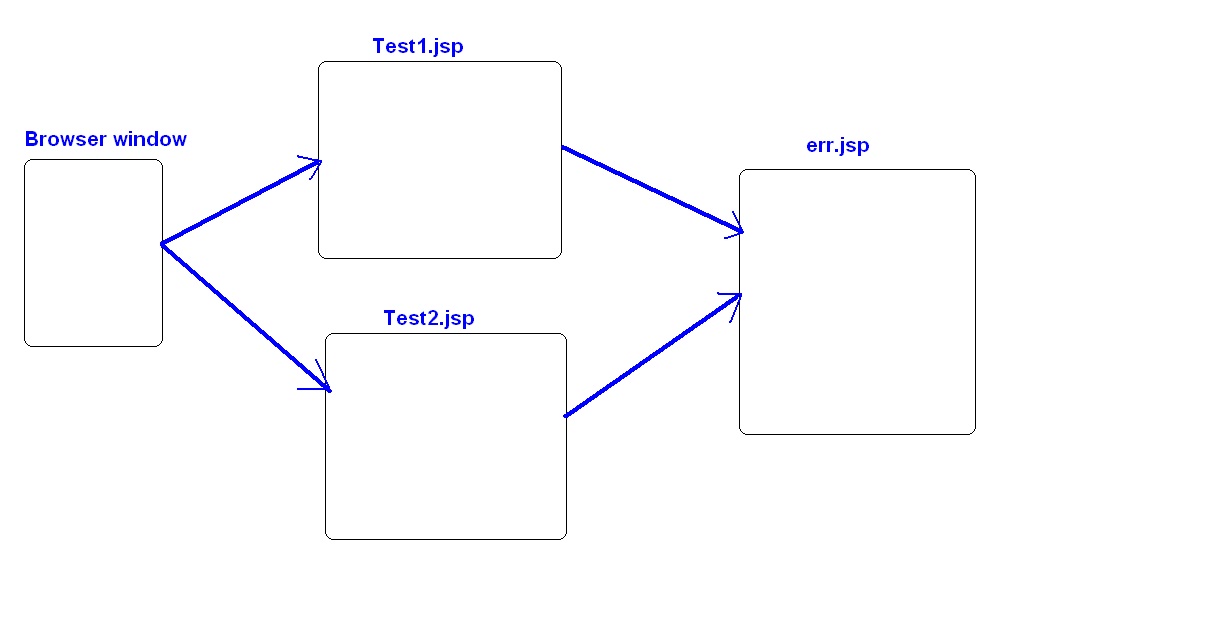
If we have multiple jsp's and we want to configure an error page of all those jsp pages.
In this situation configuring seperate error page for each jsp is not recommended rather to
take only 1 jsp page as error page and configure it for multiple jsp's...
That is global error page configuration in jsp....
we have to configure this global error page in web.xml so that each jsp page can use this
error page.

Deployment Directory Structure

--------------------------------------------


ErrJspGlobal 

        |-------WEB-INF
                          |----------------web.xml
        |--------Test1.jsp
        |--------Test1.jsp
        |--------err.jsp


Test1.jsp
**********
<b><i><center>Here is Test1.jsp</b></i></center>
<% int x=Integer.parseInt("10a");%>
<b>X value is   <%=x%> </b>


Test2.jsp
***********
<b><i><center>Here is Test2.jsp</b></i></center>
<% Class c=Class.forName("java.lang.System");%>
<h2>Loaded Class is <%=c.getName()%></h2>


err.jsp
*******
<%@page isErrorPage="true"%>
<center><h1>From err.jsp</h1><br>
<font color=red size=5>Internal Problem
<br><br><br>

<b>Exception that is rised is: </b><%=exception.toString()%>
</font>
</center>


web.xml
*********
<web-app>
        <error-page>
                 <exception-type>java.lang.Exception</exception-type>
                 <location>/err.jsp</location>
        </error-page>
</web-app>

The only thing that we have to keep in mind while working with global error page is
Configure it into web.xml.
If you observe carefully there is no such special code in Test1 and Test2 and still we are
using only 1 error page for all the jsp's.


Thats how we can configure local and global error page in jsp ...

if we configure both ofcourse priority will be given to local error page ....

Sunday, November 25, 2012

File Uploading in Servlet

File Uploading :


As most of us have already done this file uploading operation As End User but so far we are not familiar with the internal moves of it. The moment we come to servlet level programming of file uploading we get to know How this concept works actually...

File Uploading is nothing but transferring a file from client System to Server System for persistence.

To work with File Uploading Concept of servlet, Servlet API is not capable enough to provide support for it.
There is no such predefine classes and interface to work with.
So In that case we have to take the support of Third Party API like javazoom api.Although there are multiple Third party vendors provide adequate support for file uploading in servlet.

Basically we require following 3 jar file(from javazoom api) to work with file uploading concept of servlet.

1)uploadbean.jar        (Main jar file)
2)cos.jar                    (Dependent jar file)
3)struts.jar                  (Dependent jar file)

Main jar file(uploadbean.jar) should be added to classpath and main & dependent(all 3) jar file should be added to WEB-INF/lib folder of our web application..

Upto here we done with Background preparation now the time is to see the coding part of it.

For a moment if we assume that we are uploading file somewhere At very first glance the picture comes in our mind is.....some html page and textboxeses along with browse button.....

It is very simple to create this html page ...

upload1.html

<html>
       <head>
             <title>Shows How to upload files</title>
       </head>
       <body>
              <form action="test1" method="post" name="upload" enctype="multipart/form-data">
                     Select File 1:<input type="file" name="uploadfile1"><br><br>
                     Select File 2:<input type="file" name="uploadfile2"><br><br>
                                        <input type="submit" value="Upload">
              </form>
      </body>
</html>


method="post"  :

---------------------
Get method does not support file uploading operation so it is mandatory to go with post method here

The following are diffrenet enctype attribute:

a)application/x-www-form-urlencoded
b)multipart/form-data
c)text/plain

if enctype="application/x-www-form-urlencoded"

------------------------------------------------------------------
Then http protocol translates/converts white spaces into "+" symbol and special charecter into hexadecimal value while transferring data/file from client machine to server machine.


if enctype="multipart/form-data"

------------------------------------------------
Here http protocol doesn't apply any conversion it transfers data/file as it is to server..
no changes at all....This is recommended enctype attribute value...

if enctype="text/plain"

-------------------------------------
here http protocol translates/converts white spaces into "+" symbol and does not translate special charecter while transferring data/file to server.


Now we are going to code servlet for this ...

UploadServlet.java

import java.io.*;
import javax.servlet.*;
import javax.servlet.http.*;
import javazoom.upload.*;

public class UploadServlet extends HttpServlet
{
           public void doPost(HttpServletRequest req,HttpServletResponse res)throws ServletException,IOException
               {
                   try{
                         UploadBean ub=new UploadBean();
                         ub.setFolderstore("c:/store");
                         MultipartFormDataRequest mreq=new MultipartFormDataRequest(req);
                         ub.store(mreq);
                         PrintWriter pw=res.getWriter();
                         pw.println("<h1>File Successfully uploaded </h1>");

                         pw.close();
                       }
                          catch(Exception e)
                         {
                                e.printStackTrace();
                          }
            }
}


Line by line understanding of the Above Code
---------------------------------------------------------

UploadBean ub=new UploadBean();


Creating UploadBean class object, it is used for storing the uploaded file in a server storage area.

ub.setFolderstore("c:/store");


Here we are specifying the location where the uploaded file will go..

MultipartFormDataRequest mreq=new MultipartFormDataRequest(req);


To read the file which are uploaded along with the request, we need to convert ServletRequest obj into MultipartFormDataRequest obj...

ub.store(mreq);


To store the uploaded files into a server we need to call store(-) of UploadBean class by passing MultipartFornDataRequest obj as parameter.

In MultipartFormDataRequest there is method getFiles() and it is internally called by store() for reading the uploaded files.

web.xml

<web-app>
            <servlet>
                     <servlet-name>abc</servlet-name>
                     <servlet-class>UploadServlet</servlet-class>
            </servlet>
           <servlet-mapping>
                     <servlet-name>abc</servlet-name>
                     <url-pattern>/test1</url-pattern>
          </servlet-mapping>
</web-app>


Deploymenet directory Structure:


UploadApp
    |------------------WEB-INF
    |                              |---------classes
    |                                              |-------------UploadServlet.java
    |                                              |--------------UploadServlet.class
    |                              |------------web.xml
    |                              |------------lib
    |                                              |-----------uploadbean.jar
    |                                              |-----------cos.jar
    |                                              |-----------struts.jar
    |-----------upload.html


Deploye the following web application in tomcat server and test it with this url

    http://localhost:8080/UploadApp/upload.html


You will get this page first


Once we select the file by clicking on the button. and when we click on "Upload"

we'll get this page showing output.


 Now we can check whether this file has successfully Uploaded or not by going to the specify place.
In This example we have taken E:/strore folder....

That's all about Uploading a file in server through Servlet......


Saturday, November 24, 2012

Different States Of Hibernate POJO Class Object


3 States of Hibernate POJO class object :
 

1)Transient State                                                                                                 

2)Persistenet State                                                                                    

3)Detached State 


As we know already, Hibernate pojo class object contains data and we perforn certain DB operation in order to make this data(object data)  persist/manipulate and etc with DB..


--> Transient State object doesn't contain identity value and also doesn't represent record of the DB table because it is just created object of HB pojo class.


This State is not under the control of ORM S/w.....

-->Persistance State object Contains identity value,represent DB table record/Row and also maintains Synchronization with DB table record.                                                                               This object is required to develope persistance logic.

-->Detached State object contains object value but doesn't represent record & doesn't maintain Synchronzation with DB table record.


Every hibernate Application contains one logical memory called persistance context having persistance State HB pojo class object ...


In the above stuff i have used term Synchrinization and one more identity value.....


Synchrinization:                                                                                                         

*******************

So lets understand what Synchronization  is....


if we do modification on Pojo class object our intention is very clear that it should reflect on DB table record shouldn't it?                                                                                                                      and same thing done with DB table record should reflect on associate pojo class object

So Hibernate S/w gives flexiblity to do this and this is commonly known as Synchrinization...


if we go for definition of synchrinization so it would be something like...

Synchrinization : Modification done on pojo class object will be reflection in the record of DB table and vice versa.... 


IdentityValue:                                                                                                                           ***************                                                                                                                                

Identity Value is the criteria value/condition value that makes Hibernate s/w to know where(in which row) it has to perform certain DB operation...

otherwise how this Hibernate s/w will come to know that it has to perform operation in this perticular row..????

 For this purpose identity value is requierd...


* Programmer configure one or more member variable of HB pojo class as identity field.ORM s/w uses this member variable value as isentity value of HB pojo class object that are representing Db table rows.


*HB s/w internally identifies each HB pojo class object through its identity value & aslo uses that value as criteria /condition value to maintain Synchrinization b/w HB pojo class object and table records.


*HB s/w internally generates update query having identity value as criteria value to reflect the modification done in object to Db table records...(Object to Row Synchronization).


*HB s/w generates select query having identity value as criterai value to reflect the modification done n DB table record to object.. (DB Table record to Object Synchronization)..


Wednesday, November 7, 2012

Sting handling in java

String Handling in JAVA

String Handling is an important part of any programming language.
String
Strings are widely used in JAVA Programming, are a sequence of characters. String Class is defined in java.lang package so it is implicitly available for all programs

String class has following features:-
It is Final class
Due to Final, String class can not be inherited.
It Extends object class.
It implements Serializable, Comparable and CharSequence interfaces.
It is immutable.
It is also a datatype in java

String Example 1:Creating new String
String a=”Ashish”;
String b=new String();
String c=new String(“Ashish”);

String Example 2:Comparing String
String a=”Ashish”;
String b=”Ashish”;
String c=new String(“Ashish”);
if(a==b) System.out.println(“Same reference “);
if(a==c) System.out.println(“Same Reference of A and C “);
else System.out.println(“Not Same Reference “);

There are two ways to create a String object in Java- 
1.Using the new operator. For example,
String str1 = new String("Prateek");.
2.Using a string literal. For example,
String str2="Prateek"; (string literal)

But these both "Prateek" have different reference. So if we compare str1 & str2, this is not equal. because str1 is created using new operator.

This diagram show the difference-


String Class Methods & Example
Click here

StringBuffer Class in JAVA
The java.lang.StringBuffer classes should be used when you have to make a lot of modifications to strings of characters. As,String objects are immutable , so if you choose to do a lot of manipulations with String Objects, you will end up with a lot of abandoned String objects in the String pool.

StringBuffer Example
StringBuffer sb=new StringBuffer(“Hello”);
sb.append(“Hyderabad”);
System.out.println(sb); //HelloHyderabad

Wednesday, October 24, 2012

Easy way to find out Mime Type details


How to know about the different Mime Types details.

Whenever we start writing code inside servlet very often we come across some general setting like…

PrintWriter pw=response.getWriter();
and
response.setContentType("text/html");

if we specifically talk about setContentType(-), this method indicates, In what kind of format ,data should be printed on browser by default it prints in html format.

But the Question is how can we know what all mime types are there and how do we gather it.

By seeing java notes or by googling it .....Ofcourse, But its lengthy process!!!


Here is the easiest way ...

its very simple we can find it in just 3 steps ,nothing more.....


Step1) press window key+R

 you'll get Run prompt there you type "regedit" and then ok


for better visibility of image click on it.

***********************************************************************

Step2)Registry editor will be opened...

Here you have to click on "HKEY_CLASSES_ROOT"


************************************************************************

step3) Now Scroll Down, look for the extension you want click

on that you will get mime type


************************************************************************

now copy and paste in setContentType("application/msword")


That's how you can find mime type for any format

Don't need to remember all mime types.

hibernate FAQs


hibernate FAQs